Archive for October, 2008

I am currently in our mini van on the way to California from Utah. I was excited to test out the Cell Ranger on this trip and see if it improved my cellular and data card reception. I have the antenna magnetized to the roof. Now it is a little difficult to say if it is the Cell Ranger or just an improved Sprint network but the connectivity has been great. Right after St. George is a big canyon that always had horrible reception in the past. It has been about a year since I have been through it. This time the data signal from the data card only dropped once. I was amazed. But again, I don’t know if Sprint just improved their coverage through there or if the Cell Ranger is actually doing what it claims it can do. For now I am going to believe it was the Cell Ranger. Maybe on the drive back I’ll turn off the Cell Ranger and see how long I stay connected.

Cell Ranger

Author: Steve Martin

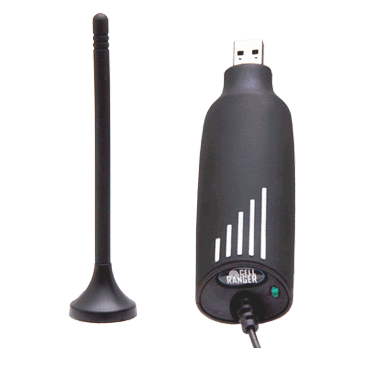
This is a product I have recently stumbled across. It is a cellular signal enhancer for those of us that suffer from cellular signal dysfunction. No, it isn’t blue. It is a very simple device and comes in two version for power purposes. One is the USB version and can plug into any USB port to receive it’s power (pictured). The other uses a standard 12V cigarette plug for power.

I would recommend the USB version because you have a lot more flexibility in where you can use it. They make cheap little 12V and regular power adapters that have a USB plug on them to power up any USB device without needing to use the ones in a computer. You could is one of these adapters to power up the Cell Ranger as well as any other USB powered devices you may use.

Anyway, you simply plug this little device into a USB port and it starts boosting the cellular signal around it for about 6 feet. It claims it will boost the signal by about 2-3 bars, thus improving clarity and preventing dropped calls. It actually has a microprocessor in it that takes the cellular signal and repeats it at a low level right around the antenna. It works for both cell phones and data cards on any network (except for some Legacy iDEN Nextel signals also used by some Canadian cellular providers). 

The unit costs $150 plus shipping. It can be used anywhere to give your cellular signal a little boost. Currently, I have never actually used a Cell Ranger but I intend to change that. I have one ordered and plan to test it out on an upcoming trip to Disneyland. I figure that it might be useful in the car on the way down and back up and will hopefully improve the signal I get from my hotel room. You have to think about your ability to connect and work while on vacation when your company consists of you and only you. When I have some more experience with the Cell Ranger I will give an update on its claims. If I like it, I will become a reseller and be able to sell the device at a discount. For now, you can get more info by visiting their website directly at www.getcellranger.com.

Dell Days of Deals

Author: Steve Martin

It’s that time again. Time for 10 consecutive days of deals from Dell on various electronics. Each day they will have special promotions on different items so it’s best to check back daily to see if the new deal is something you are in need of. Just click on the Dell image each day and it will be updated with that day’s deal. You will see great deals on desktop and laptop computers, flat panel TVs, digital cameras, home theater systems, Blu-Ray Players and more. Each day’s deals lasts for one day only so be sure to check it out. The deals start today and end on the 23rd.

Hard Drive Crash? Try Drobo.

Author: Steve Martin

I believe that it is a fact that all hard drives will eventually crash. This is why I make sure that I setup some kind of a backup for my clients. It is extremely important to have some kind of a regular backup in place. If you are manually backing up your data, make sure you do it regularly. DON’T FORGET! It would be best to setup your backup to automatically happen on a regular schedule. This will save you all kinds of pain, frustration, time, financial loss, blood, sweat, and tears. As soon as you start using a computer, start backing up your data. I have seen the hard drives of some clients last years and years. But, The hard drives in two different servers lost a RAID 5 hard drive (this means that no data was lost as we just needed to replace the missing drive in the array) after about 2 years. another client’s hard drive lasted about 4 years (not in a RAID 5 array) before it died. He luckily had most of a backup and lost very little data. I have also had a couple of workstations lose a hard drive after only a couple of months. In the workplace users will typically save their data to the server which is backed up and therefore we don’t backup the individual workstations. So, while these two workstations didn’t really lose much data, it could have been much worse.

I recently had one of my movie storage hard drives fail. It was a 500 GB external hard drive and it was pretty much FULL of movies. Did I have this hard drive backed up? Nope. In this particular case, the data was not all that valuable as I can easily redo the movies since I still have all the original DVDs. But, it will cost me a lot of time to redo all of them. It is a very good time to reflect on my backup practices though.
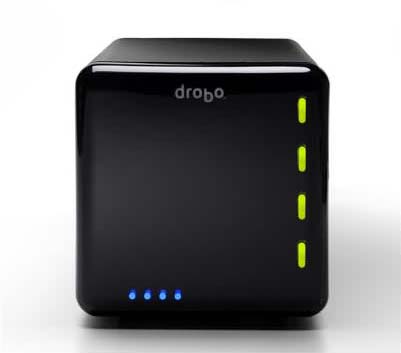
A while back, I ran across a very unique product targeting backup, although it may be reliable enough to use for everyday file usage and storage. It is called drobo and is short for “Data Robot”. It is basically an intelligent external hard drive.

It is a small box that can hold 4 Sata hard drives of any capacity. It has a unique new proprietary kind of RAID protection built in. It makes sure that if one of the hard drives inside it fails, your data stays completely in tact. And, not only that, but it lets you continue to work as if nothing happened. It alerts you by the lights on the front that something is wrong. You would then simply replace the failed hard drive with a new Sata drive of any capacity and it re-adjusts to provide you the additional space of the newly inserted drive.

I have known about the drobo since the first version and held off buying one for a few reasons:

  • First, price. This little baby costs $500 without any hard drives in it. While that isn’t a ton of money for this kind of protection (it’s actually kind of cheap when you look at the inferior competitors) it is enough to make you think twice about whether or not you really need this device instead of a couple of standard (stupid) external hard drives.
  • Second, version one was a bit slow in reading and writing to the device. If I am going to use this for daily use of files, I need it to be decently fast. They fixed this in version two. Reading and writing are now approximately twice as fast as version one. (If you just want to use the drobo as a backup device, you can still pick up version one for around $350 while they close them out.)
  • Third, I wanted a network attached storage device so that I didn’t have to leave a computer on in order to access the files. I could simply attach it to the network via a network cable and my files would be available to any of the devices on my network. Droboshare took care of this. Droboshare is a small attachment with an Ethernet port that connects to the drobo via a USB cable. It then makes all of the files on the drobo available to the other network devices. This also means a bit more expense though.


So, because of my crashed drive, I am going to purchase a drobo to test it out. I may start with just the drobo and add the droboshare later. I will start out with my existing hard drives and add more as my capacity needs grow. The second generation drobo can handle as much as 16 TB of data (first generation could handle up to 4 TB) so, it may be a while before I reach those kinds of capacities. If I fill all of the drive bays with drives and find that I need more capacity, I simply remove the smallest drive and replace it with a larger capacity drive. Drobo works in the background to re-configure everything so that my data is safe and I can begin using the extra capacity. This is not possible with standard RAID 5 configurations on other devices as the replacement drive must be the same size as the lost drive or the RAID array will not recognize the new drive.

I will let you know whether I like the drobo or not once I have one in my hot little hands to test. I plan on putting it through it’s paces to make sure it is a valuable investment. I may become a reseller of theirs if I am pleased with the results. Either way, backing up your data is crucial. If you haven’t thought about backing up your data, why don’t you go get started right now. You never know when your hard drive will crash.

Press Release

FOR IMMEDIATE RELEASE

Smart Technology Receives 2008 Best of Riverton Award

U.S. Local Business Association’s Award Plaque Honors the Achievement

WASHINGTON D.C., October 10, 2008 — Smart Technology has been selected for the 2008 Best of Riverton Award in the Computer Consultants category by the U.S. Local Business Association (USLBA).

The USLBA “Best of Local Business” Award Program recognizes outstanding local businesses throughout the country. Each year, the USLBA identifies companies that they believe have achieved exceptional marketing success in their local community and business category. These are local companies that enhance the positive image of small business through service to their customers and community.

Various sources of information were gathered and analyzed to choose the winners in each category. The 2008 USLBA Award Program focused on quality, not quantity. Winners are determined based on the information gathered both internally by the USLBA and data provided by third parties.

About U.S. Local Business Association (USLBA)

U.S. Local Business Association (USLBA) is a Washington D.C. based organization funded by local businesses operating in towns, large and small, across America. The purpose of USLBA is to promote local business through public relations, marketing and advertising.

The USLBA was established to recognize the best of local businesses in their community. Our organization works exclusively with local business owners, trade groups, professional associations, chambers of commerce and other business advertising and marketing groups. Our mission is to be an advocate for small and medium size businesses and business entrepreneurs across America.

SOURCE: U.S. Local Business Association

CONTACT:
U.S. Local Business Association
Email: PublicRelations@USLBA.net
URL: http://www.USLBA.net

###

Pretty amazng right? Well, it is kind of a joke. I received this notification in my inbox this morning. I checked the company’s website that awarded this to me. If I want to receive the plaque, I have to pay for it. I didn’t even bother to find out how much they wanted. Maybe I should start giving out awards to companies and charging them for the awards. I could make a lot of money. Here is a link to their “official” press release. It’s amazing what people will do to trick you into giving them money. Beware people.

Why?

Author: Steve Martin

Why is it that babies have this uncontrollable urge to move around when you are trying to feed them? I am not quite sure what the disgusting mixture is that I was feeding her and I don’t think I want to know. She seemed to be enjoying it even though it looks like she wasn’t. I am amazed at how quickly an arm or even a leg can swat out as I am moving the spoon toward her mouth. She was in big trouble and she knew it but she still let out a big grin when I brought the camera out to capture her messiness on “film”. It is very hard to stay mad at her when she gives you a grin like that. There was green stuff on the backrest, the side and all inside the buckle. It was gross. It’s a good thing she’s cute.

Post Control in WordPress

Author: Steve Martin

I have setup a bunch of WordPress blogs for family and friends and have actually had several people abandon these blogs because they could not control who sees them. Some might be a little paranoid but still. They would like to be able to control who can see which posts. I know it is possible to make a blog private by requiring a user account and make it all or nothing but I would like to see more control than that.

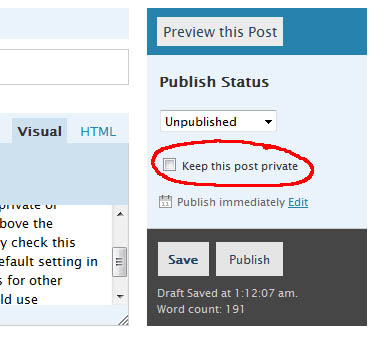
When you write a post, on the right you have a checkbox to make the post private. That is great but I think we should add several more checkboxes such as Everyone (anyone visiting can see that post without having to log in), Family (Only logged in users that have been marked as family can read these posts), Friends (Only logged in users that have been marked as friends can read these posts), Co-Workers (Only logged in users that have been marked as Co-Workes can read these posts), etc. The group names could be customizable but you get the point. You should be able to mark a post for multiple groups unless one of those groups is Everyone or Private. These two would trump anything else. Private posts would remain visible to the author of that post and admins only.

These groups are completely different than the user rights currently in WordPress as these would only control who could READ individual posts. The ones currently in Wordress control user rights and what they can DO in Worpress.

For me, I don’t care who reads what, but I have been asked about setting something like this up for several users and have not found any plugin that can do this. It seems very simple but I am no code guy and I actually do not think this should be a plugin but actually part of the WordPress core. Although I personally wouldn’t really have a need for it. I can definitely see the benefits of such abilities and can see how some of my clients and family and friends could utilize it.

For example, if you have a WordPress blog setup in a business environment, you could allow only certain departments to read certain posts. You may want to setup your groups as Accounting, HR, PR, Manufacturing, Sales, etc. That way, each department head can write things specific to their department and only their department would be able to read it when they were logged in (saves other departments having to wade through a bunch of irrelevant info to find info pertaining to them too). Any post aimed at everyone in the company would be marked with all the departments checked. They could mark anything they want the general public to be able to see as Everyone. So, it could be used for both internal and external visibility.

I guess this is more of a post control wish than user control. Each user in WordPress would then have to be put into one or more post category group. Users could be in more than one post category group but typically they would probably be in just one. A CEO would probably be in every post category group.

Anyway, that is my BIG feature request for the WordPress developers. If you like my idea, vote for it here.