
Oct
13
2008
Hard Drive Crash? Try Drobo.
Author: Steve Martin I believe that it is a fact that all hard drives will eventually crash. This is why I make sure that I setup some kind of a backup for my clients. It is extremely important to have some kind of a regular backup in place. If you are manually backing up your data, make sure you do it regularly. DON’T FORGET! It would be best to setup your backup to automatically happen on a regular schedule. This will save you all kinds of pain, frustration, time, financial loss, blood, sweat, and tears. As soon as you start using a computer, start backing up your data. I have seen the hard drives of some clients last years and years. But, The hard drives in two different servers lost a RAID 5 hard drive (this means that no data was lost as we just needed to replace the missing drive in the array) after about 2 years. another client’s hard drive lasted about 4 years (not in a RAID 5 array) before it died. He luckily had most of a backup and lost very little data. I have also had a couple of workstations lose a hard drive after only a couple of months. In the workplace users will typically save their data to the server which is backed up and therefore we don’t backup the individual workstations. So, while these two workstations didn’t really lose much data, it could have been much worse.
I recently had one of my movie storage hard drives fail. It was a 500 GB external hard drive and it was pretty much FULL of movies. Did I have this hard drive backed up? Nope. In this particular case, the data was not all that valuable as I can easily redo the movies since I still have all the original DVDs. But, it will cost me a lot of time to redo all of them. It is a very good time to reflect on my backup practices though.
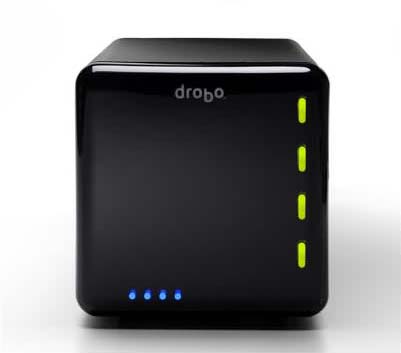 A while back, I ran across a very unique product targeting backup, although it may be reliable enough to use for everyday file usage and storage. It is called drobo and is short for “Data Robot”. It is basically an intelligent external hard drive.
It is a small box that can hold 4 Sata hard drives of any capacity. It has a unique new proprietary kind of RAID protection built in. It makes sure that if one of the hard drives inside it fails, your data stays completely in tact. And, not only that, but it lets you continue to work as if nothing happened. It alerts you by the lights on the front that something is wrong. You would then simply replace the failed hard drive with a new Sata drive of any capacity and it re-adjusts to provide you the additional space of the newly inserted drive.
I have known about the drobo since the first version and held off buying one for a few reasons:
- First, price. This little baby costs $500 without any hard drives in it. While that isn’t a ton of money for this kind of protection (it’s actually kind of cheap when you look at the inferior competitors) it is enough to make you think twice about whether or not you really need this device instead of a couple of standard (stupid) external hard drives.
- Second, version one was a bit slow in reading and writing to the device. If I am going to use this for daily use of files, I need it to be decently fast. They fixed this in version two. Reading and writing are now approximately twice as fast as version one. (If you just want to use the drobo as a backup device, you can still pick up version one for around $350 while they close them out.)
- Third, I wanted a network attached storage device so that I didn’t have to leave a computer on in order to access the files. I could simply attach it to the network via a network cable and my files would be available to any of the devices on my network. Droboshare took care of this. Droboshare is a small attachment with an Ethernet port that connects to the drobo via a USB cable. It then makes all of the files on the drobo available to the other network devices. This also means a bit more expense though.
So, because of my crashed drive, I am going to purchase a drobo to test it out. I may start with just the drobo and add the droboshare later. I will start out with my existing hard drives and add more as my capacity needs grow. The second generation drobo can handle as much as 16 TB of data (first generation could handle up to 4 TB) so, it may be a while before I reach those kinds of capacities. If I fill all of the drive bays with drives and find that I need more capacity, I simply remove the smallest drive and replace it with a larger capacity drive. Drobo works in the background to re-configure everything so that my data is safe and I can begin using the extra capacity. This is not possible with standard RAID 5 configurations on other devices as the replacement drive must be the same size as the lost drive or the RAID array will not recognize the new drive.
I will let you know whether I like the drobo or not once I have one in my hot little hands to test. I plan on putting it through it’s paces to make sure it is a valuable investment. I may become a reseller of theirs if I am pleased with the results. Either way, backing up your data is crucial. If you haven’t thought about backing up your data, why don’t you go get started right now. You never know when your hard drive will crash.

October 14th, 2008 at 8:35 am
Thanks for that last blog! It reminded me that I needed to back up some stuff on my computer!