Archive for the ‘Computer Networking’ Category

Windmill Poles

Author: Steve Martin

powerlinetowerThe craze these days is to green up our lives. We are supposed to buy hybrid cars, put solar panels on our roof, buy more energy efficient appliances and light bulbs, in addition to buying only organic food (thanks John and Kate plus 8). I think it’s great. I am not a tree hugger or anything like that, not that I have a problem with those of you that dedicate yourselves to saving the planet. I think we really should be good to the planet that we all enjoy. I am just not fanatical about it. I do my part by recycling, but only because our city charges me for it whether I actually do it or not. And it doesn’t take any extra effort really. So yes, I’m doing my part.
I have been working on a project for a new company recently. The company is looking to distribute a brand new windmill technology that is much more efficient than the ones we are accustomed to seeing all over the place. So, I’ve had windmills on the brain and have had to do a little research into the benefits of wind electrical generation. It’s pretty interesting stuff.

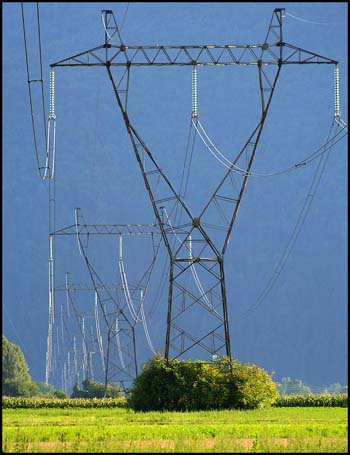
Anyway, I was standing on my back deck looking out at the Salt Lake valley since the weather has been so nice. I looked out at the west part of the valley and noticed a big long line of power poles which I assume carry our electricity across the state, possibly into neighboring states. These aren’t the little utility poles we see in the neighborhood, these are the giant ones that are really tall and have lots of power lines on them similar to the ones in the picture.

It made me think of a GREAT idea. When a windmill is installed somewhere, a big chunk of the cost is the big tall pole that must be installed in order to get the windmill high enough to reach the higher, faster, more consistent winds. Well, why not use those poles that are already there? Lets stick a smaller sized windmill on each and every power pole out there. They are already pretty darn tall and typically in less populated areas with less wind obstructions. AND, you have a bunch of power lines to tap into right there. Each of those towers should be generating a bit of electricity as they carry the power to their various destinations.

I am guessing that there is at least a little power loss trying to send power over such long distances. By placing a highly efficient windmill on each tower, you could compensate for that loss and probably end up with more power at the destination than you initially put in at the source. The first portion of building a wind farm is already in place which means a lot of the initial cost is eliminated. And with the new generation of free power, we will all save some change each month on our power bill (my favorite part).

Now, all I need to do is get an investor or a grant from the government and make it happen. Anyone want to invest in my idea? It sounds like a winner to me.

I am a huge fan of the Windows XP Media Center operating system (also Vista Home Premium). It makes it so easy to save all your media content on one computer and have it shareable throughout your home via other computers or Media Center Extenders. Right out of the box you have the ability to share your music, pictures, videos, TV, and radio. You can also install additional programs to extend the functionality of your Media PC. I very much enjoy the program “My Movies” as it lets you create a database of your movie collection complete with an image of the movie cover. Not only that but if you RIP the movie to your hard drive, you can simply choose “Watch” and it will immediately begin playing. I have a media library of over 250 movies so far that are (almost) all available at the click of a button (I say almost because I haven’t yet figured out how to RIP a movie WITH the subtitles in tact, so for those foreign movies we still have to be old school and put in the disk).

I thought I would make this blog entry about the process I use to RIP movies as there are some hoops to jump through in order to do it successfully. Let me start off by saying that I do not endorse ripping movies that you do not own. This is not intended to help you steal movies but to help you put your legally purchased movies onto your hard drive. Having said that, let’s get started.

Backup

First, I like to make a backup copy of the DVD. I have used two programs to do this. I started with “ICopyDVDs2” which is pretty good but there are some disks (mostly Sony Movies) that it cannot do. It is pretty cheap software though. Later on I found “DVDFab 5”. This one has a much better success rate. They are both able to squeeze a movie down to fit a standard single layer DVD from a dual layer original. So, using one of these two programs you make your copy of the original disk. One additional feature of DVDFab 5 is that you have the option of copying just the main movie without all of the other special features, games, etc. This is helpful so that your backup copy is as high quality as possible despite having possibly been shrunken down to fit a single layer disk. Also, by doing this step first, you can remove any encryption the original movie may have had so your backup copy is easier to RIP.

RIP

Next we rip the movie from the newly created backup copy. Ripping from the backup makes the resulting movie a bit smaller in size so as not to take up too much hard drive space. To do this, I use “DVD Decrypter”. I like DVD Decrypter because it has a setting that will combine the various VOB files from the DVD into a single large VOB file. Usually they are split up into 4 to 6  one GB files. You can go either way but the single file saves a step later. And again, there are some disks that don’t rip perfectly using DVD Decrypter. DVDFab 5 can fill this void as well. If using DVDFab 5, I will first copy the movie and then when DVDFab 5 asks if I want to burn another copy, I will go to the temporary area DVDFab 5 uses to store the individual VOB files and copy them out of that directory to be used later. The whole point here is to get the VOB (or VOBs) to use for the next step.

Convert to MPG

Next step is to convert the VOB or VOBs to a single MPG file. The program I use for this is “Video ReDo Plus”. There are three reasons for using this program. One is that the ripped VOB or VOBs are sometimes off in their timing. Video ReDo re-times them so they play correctly using the “Quickstream Fix” feature. Two is that it has the ability to combine multiple video files into a single file using it’s “Joiner” feature. (if you have multiple VOBs, first run the VOBs through the quickstream fix which converts the file to MPG and re-times it simultaneously, then use Joiner to paster the different pieces together into one large file). Three is that it converts to the MPG format. The MPG format is compatible with playing through a Media Center Extender like an Xbox 360 through your network. The file that results from using this program is the finished file ready to play.

Enjoy

That is basically it. Now that you have your finished MPG file, you can organize them into individual folders and then point “My Movies” to each locally stored folder. My Movies then looks in that folder and plays the MPG file when you click to “watch” from your Media Center Extender. If you have questions about any part of the process, please comment so that I can clarify a little better.

Amazon Movies

I want to leave one note about the digital movies that you can buy from Amazon. I was excited about this new way of purchasing movies until I actually tried it. I bought “The Dark Knight” DVD from Amazon and they included a digital download of the movie for free. This was great because I wouldn’t have to go through the process to RIP the movie myself. Well, one night my wife and I decided to watch it so I downloaded the movie which is pretty simple once you install the Amazon video download software. I don’t know if all of the Amazon movies are in the WMV format but this one was. I saved it in a directory where we could play it through an Extender and we headed downstairs to watch it. The picture looked great, just like a DVD. But, the sound was not good at all. We found ourselves turning up the volume so that we could hear what the actors were saying only to be blasted away at the next action scene. So, I put in the DVD and the sound was just fine after that. Later on, I ripped the DVD into the MPG format and both the video and audio are fine. I don’t know if there was just a problem with this particular Amazon movie download or if this would be the case for all their movies but it left me not really wanting to download a movie from Amazon again. I’ll stick to actual DVDs and I’ll RIP them myself. At least it didn’t cost me anything.

i Buy Tunes at Amazon (DRM Free)

Author: Steve Martin

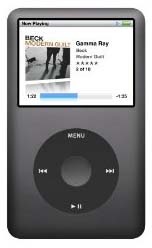
ipod1Let me start out by saying that the people at Apple are very good marketers. They come out with a shiny new device, give it a clever cute name that starts with a lower case i, and convince people that they can’t live without it. Forget the fact that it costs double what other companies charge for similar items. Forget the fact that the nice new shiny product is designed to lock you into using their software in order to make them more money. Just open your wallet and buy from Apple.

You may think that I am bitter towards Apple but I truly am not. I appreciate them very much. They do come out with some very innovative products. And, their product designs are very sexy and second to none. I don’t believe I have ever found any Windows PC hardware that is half as stylish as the iMac. All PC and other electronics manufacturers should take lessons from Apple and their clever, innovative product designs.

I most especially appreciate Apple for revolutionizing the music industry. Before they created the iPod, the only way to get music online was to download it illegally from Napster or Kazaa or some other Peer-2-Peer program. We really didn’t have any other online option but to become cyber criminals. Then the iPod came out, and with it…iTunes. Finally we no longer had to lay awake at night filled with the guilt of having downloaded hundreds of songs without paying for them. We had a way to get the same stuff legally. Each song only a buck, sometimes even cheaper. Buying an actual CD just seems weird anymore. Thanks Apple.

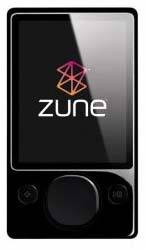
zuneBut, did you know that all the music you download from iTunes is locked up? That’s right, the MP4 format is embedded with DRM technology. What the heck is DRM? It stands for Digital Rights Management and it is designed to limit the way you use your music. In the case of Apple and iTunes, I believe you are limited to listening to the music on up to 5 devices. Well, I don’t want Apple or the music industry to be able to decide how many devices I can listen to my legally purchased music on. What if I want to listen to it on SIX devices. If purchased through iTunes, I just plain can’t. Luckily, iTunes is NOT the only place to purchase music online.

Initially, I was like most people and didn’t fully realize that everything purchased through iTunes was all locked up. And, once I found out it was, I didn’t realize I had other options anyway. Then I learned about Amazon MP3 Downloads. Through Amazon MP3 Downloads, you can get the same music found at iTunes without any DRM protection whatsoever. You can still use iTunes to play your music purchased at Amazon or you can choose to use Windows Media Player or both (or any other media player for that matter). The MP3 format is the only format fully compatible with virtually ANY portable digital music player. From what I understand, the Microsoft Zune cannot play music purchased from iTunes, just like the iPod can’t play music ripped in the Microsoft WMA format. So, stick with MP3s and you are universally compatible all the way around. If you are ripping your physical CDs, make sure you rip them as MP3 files. This means you will have to change the default settings in both Windows Media Player and/or iTunes as both Microsoft and Apple want to lock you into using their format as it then locks you into using their software and their products. 

I have rambled MUCH more than I had intended to for this article. The main point of the article is to let you know that you CAN get DRM free music through Amazon so go check it out and enjoy your music without limitations. In the long run, you’ll be glad to be free of the DRM chains, even if you don’t yet realize it.

The Ultimate Laptop

Author: Steve Martin

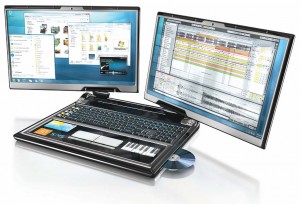
lapdualbigI think I’m in love…with a laptop. Yet, this laptop doesn’t even exist. It is a concept design put together by PC World as a wish list of things one might want to have in a laptop. Well, when I first saw the design I almost started drooling. Ok, maybe I actually did, but only a little. I would LOVE to have dual screens built into my laptop. Many of the other features in this concept drawing I could do without but those dual screens…oh baby!
I am big into screen real estate. My old tablet PC had screen resolution of 1024 x 768 while my new tablet sports resolution of 1400 x 1050. The higher resolution makes such a huge difference. Higher resolution is something I am willing to pay extra for. Now, if they made a laptop with TWO screens built in, I would be standing in line to buy it. Think of THAT kind of screen real estate in an all-in-one design. Ideally, I would like the screens to be 12.1″ or 13.3″ and the rest of the laptop to be normal size. I would also like it to have tablet functionality using a stylus. I don’t care for the 10 key built in (I suck at accounting). It must have a touchpad as I can’t stand the stupid little eraser nub that the Thinkpads always have in the middle of the keyboard. And, it needs to have a built in optical drive. Weight IS a factor as well. With dual screens you have to accept a little more weight but I would hope it could stay below 5 pounds. I believe my current tablet is around 4 pounds. Other than that, I am not too picky although a built in Sprint data card would be nice.

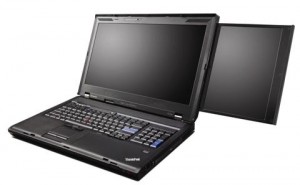
lenovodualLenovo recently announced a laptop that actually DOES have dual screens although it is not quite what I am looking for. Theirs has a main screen that is 17″ and a secondary screen that slides out of it that is 10.6″. See a video of it at CES 2009. I think they should have had a 10.6″ screen slide out of both sides of the main screen. It weighs in at 11 pounds though. At nearly 3 times the weight of my current laptop, that would be a little much for me to lug around. And, I would prefer to have two identically sized screens instead of a smaller slide-out. A third negative is price. The Lenovo starts at $3,600. That’s a little out of my league. Ok, that’s a LOT out of my league. But, the concept idea is now a reality. Now it is a matter of time before the various manufacturers start putting their own twist on the idea and come out with a bunch of different dual screen laptop models to choose from. I can’t wait for the love to become a reality for me.
So, what features are on your laptop wish list? Post comments and share your ideas.

Awesome Xbox 360 Elite Refurb Deal

Author: Steve Martin

xbox-360-elite-r-unit

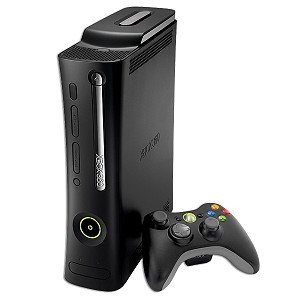
I don’t usually post a lot of product specials but this is one I could not help but share. I am a big Xbox 360 fan. No, I am not a big gamer. I use the Xbox 360 for it’s Media Center Extender functionality. It is so nice to have all of your media accessible on any TV equipped with an Xbox 360. Anyway, here’s the deal:

Xbox 360 Elite System w/120GB, HDMI, Wireless Controller & Headset (Refurbished) – $279.99

That is an awesome price. They usually sell for over $400, and this is the ELITE system. The only drawback I can see is that it says it comes with a 60 day warranty. I’m not sure if that is the geeks.com warranty or the Microsoft warranty (probably Microsoft). Anyway, check it out and decide for yourself. If you don’t already have one, it might be a good time get one. If you DO already have one, it might be a good time to pick up another one.

(Update 1-20-09) I just checked the link and anyone who did not get in on the refurb deal is now out of luck as they are sold out. Congrats to those that got in on the deal.

Cheap Virtual Fax Machine

Author: Steve Martin

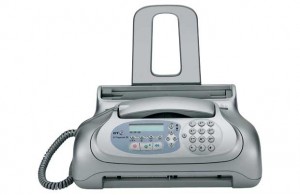
faxI love saving money. I’m sure most of you do too. There’s something about finding that product or service that you have been looking for at a bargain price. It fills you with a sense of satisfaction. Now, as long as that product or service ends up lasting as long as, or working as good as it’s higher priced alternative, you end up keeping that sense of satisfaction. Otherwise, you probably should have forked over the higher price for the better quality. There are some things you probably shouldn’t skimp on. Fax service is not something you should have to pay a lot for.
There is a very inexpensive way to be able to receive faxes for nothing, or very close to nothing. I have used these services successfully for years and have saved all kinds of money. And, in this ecomony, saving money is what we are all trying to do.

For starters, many people just want to be able to receive an occassional fax but don’t want to pay for an additional phone line every month and don’t really want or need to own an actual fax machine. For those of you that fit this bill, I would recommend K7. The K7 service is totally FREE. You are provided with a random phone number in the Washington state or Oregon area. This phone number is linked to your e-mail address. Whenever someone sends a fax to your assigned phone number, it is converted to a digital file and e-mailed to you as an attachment. You decide if you want to print it or not (saves paper too). Of course wth this free service there is a catch. After a time of inactivity (you don’t receive any faxes), your account is closed and the number can be assigned to someone else. Back when I first used this service, that length of time was 30 days but it looks like they may have upped that to 90 days. But, since you really only need the service occassionally, the next time you need to receive a fax, just sign up again and get a new fax number. Remember, it isn’t costing you ANYTHING.

K7 Summary – FREE, Out of state number, account closed for lack of use, no fax sending options.

____________________

The next step up is to have a more permanent number so that you don’t have to hassle with getting a new number every time you need to receive a fax. This option will actually cost you but it also adds some additional features that really make it worth it (and it is still pretty darn cheap).  This service is actually offered by the same company that gives us K7. The service is called Faxaway. It starts out much the same way, you get a phone number in Washington state or Oregon and whenever you get a fax, it gets converted to a digital file and e-mailed to you as an attachment. The first difference is that you actually have an account with Faxaway that you add money too. I believe that you start out adding about $12 to your account by credit card. There is a $1 per month fee to keep your account open. So, that initial $12 could last you an entire year and you don’t have to worry about losing your fax number. When your account drops to zero, they will automatically charge your credit card an additional $10. I currenty use this option instead of K7 so that I can print my fax number on my business cards without having to worry about losing that printed number and thus having to redo business cards every time I lose my fax number. The next BIG difference is the ability to send faxes from your e-mail account (no phone line needed). Once you have an Faxaway account, your e-mail address is authorized to send faxes via the Faxaway service. You simply send an e-mail to the fax number followed by @faxaway.com. So, if I wanted to send myself a fax, I would attach a file to an e-mail and e-mail it to 12068886048@faxaway.com. Once I hit send, my attachment would come through as an actual fax on the receiver’s (me) end. Each sent fax draws from your pot of money in your Faxaway account and costs roughly $0.10 per page.

Faxaway Summary – Roughly $12/year, Out of Sate number, won’t lose number, able to send faxes as well as receive.

___________________

If you don’t like the out of state phone number idea, you can add an 800 number which forwards to your assigned Faxaway number for about $2/month (plus minutes used). They also offer local numbers in certain areas for about $5/month (plus minutes used). This service is from Kall8. I don’t use this service since I receive faxes so infrequently that an out of state number doesn’t really matter. If you are in need of an 800 number, this is a very inexpensive way to get one. It is very flexible and allows you to change the number it is pointed to whenever you want and as often as you want. So, you could use it for fax OR voice service.

There are other services out there that offer virtual fax options but the price is so much higher. The one that is known by most people is efax. The efax service starts at about $17/month. It works much the same way as Faxaway but limits the amount of incoming pages you can receive before charging you more. There is no limit on the incoming pages of both K7 and Faxaway.

Passwords

Author: Steve Martin

If you are anything like me, you have dozens of different web sites that you are required to log into in order to access information. These may include your e-mail accounts, shopping web sites, banking web sites, credit card web sites, school sites, even blogging requires a password to get in and write new posts. These sites require passwords for good reason. You wouldn’t want someone jumping into your Amazon account and buying lots of stuff on your card would you? Or, think about the headaches of someone getting into your banking account. I know some people personally that have had people get into their ebay account and change pricing on their listed auctions.

You may have noticed my post (two before this one) called “Protected: Highly Confidential (Password Protected Post)“. Well, I guess I have some pretty curious siblings because two of them decided they were going to “hack” into that post (and they were successful). I don’t really care who gets into that post which is why I gave it a VERY simple “password”. But, it brings about the question of how important secure passwords are. Think about the password (s) you use for the various sites you visit. Are they just a single word? Not good as any dictionary tool could crack it. Are any of your passwords just a important date? Not good as anyone that knows you probably knows any important dates in your life or could easily find them out. Does your password contain letters AND numbers? Better. At a minimum, I would suggest using letters and numbers. You may want to throw in some unusual characters like % or & or #. Make your passwords at least 8 characters in length. The idea is to make it VERY difficult for anyone to guess.

So, if you have easy to guess passwords, I would suggest you start changing them to something a bit more difficult to guess…..because my siblings are on the loose and may hack in at any time.

$40 off 1TB Hard Drive

Author: Steve Martin

This is a great deal. I haven’t seen a 1 TB hard drive this cheap ever. So, I thought I would share it with anyone in the market for a bigger hard drive or an extra hard drive. For those that don’t know, 1 TB is 1,000 GB. That equals a lot of room for data. It is a deal from Dell and is $40 off 1TB SATA Barracuda 7200.11 Internal Hard Drive! Coupon Code: 9BPJP5C2PHKMMC. That coupon code is important. Use the link above and add the item to your cart and then apply the coupon code and it will take off the $40. Shipping is very decent too.

This content is password-protected. To view it, please enter the password below.

This is my list of technologies that you should never use or you will be in for it. The problem with these technologies is that they are too nice to be without once you have tried them. So, you can either take my word for it and stay far away from these technologies or try them and forever be hooked. They are in no particular order.

Cell Phone – I got my first cell phone back in 1998 when Sprint had a promotion for 100 minutes at only $10 per month. What a deal! I was going to finally have a cell phone and it was going to be so cheap. That is until you find out how long 100 minutes really is. You go through 100 minutes in no time at all. Especially because they didn’t offer any evening weekend minutes or Sprint to Sprint minutes. It was 100 minutes total. When I would check my voicemail, it used up minutes too. I was very careful with my minutes at first, and then I just had to have more so I upgrade my plan and am now up to a family plan with 3,000 minutes shared among 6 phones with unlimited evening weekend and Sprint to Sprint. I also have a Sprint datacard for my laptop. So, while Sprint gave me such a great deal up front, they have probably made plenty of money since. Good marketing Sprint. So, be warned, if you get a cell phone, you will not be able to not have a cell phone.

DVR – A DVR (Digital Video Recorder) changes the way you watch TV. The brand of DVR that you probably know the best is Tivo. They revolutionized the concept and made it so simple for anyone to use. Most of the major manufacturers of electronic equipment have some type of DVR available and you almost can’t subscribe to satellite without them throwing in a free DVR. I am stationed in the Microsoft camp for my DVR using a Windows XP Media Center PC. I find that having a computer be the DVR, I can utilize it for so many other things as well. The concept is very simple, a DVR has a schedule of all of the programs available from your TV provider (you tell it which provider you use). You run through the schedule and tell it what to record and whether to record it just that once or to continue to record that same show whenever it airs. Then you forget about it. When you are ready to watch your show, you go into your recorded shows and push play. You can then fast forward, pause, and rewind that show and keep it as long as you have the space on the DVR. DVRs are also great for live TV as you can hit pause whenever you want and take a potty break (something we have to do frequently for our kids or they’ll wait too long and….). Anyway, you get the idea. You can read about our DVR withdrawals when I fried the TV tuner in the computer. We are now back up and running but it was rough to be without the DVR.

Computers/Internet – Yes, there are still people that have not really used a computer. My mother-in-law is one of them. She actually refuses to use one. I think she’s afraid that if she were to learn to use a computer, that her husband would put her to work. She doesn’t understand that if she were to use one, she could do so much more for herself. Computers are about the most useful and time saving devices that exist. If I can ever get my mother-in-law to actually use one, there’s no going back. She does not understand this. I know that once you learn the basics of the computer your life is forever changed and you are able to do so much more than you could without one. The Internet makes a computer about 1,000 times more useful and time saving. There is nothing that even compares with the Internet with the vast amounts of information at your disposal once you get connected. So this one is kind of a two part technology to never use, a computer with the Internet. You can do a lot with a computer but you can do SO much more with a computer connected to the Internet.

GPS – When I would travel to a place that I had never been to before and try to navigate new streets and find desired destinations, I would get nervous, stressed and frustrated. Even when I would map out my itinerary ahead of time, it was difficult to follow the map and try to keep my eyes on the road. Missing turns and going the wrong way was common back then. Now, I have GPS and won’t be able to be without it. It is a stress reliever. When we bought our van, we chose to get the model with GPS built in and let me tell you, it is so nice to have. I use it more than I ever need to. I turn it on first thing when I get in the van even if I know where I’m going. There’s something about seeing that little red arrow tracking my every movement that gives me comfort. Even if I have no idea where I am, it does. It can find restaurants and stores and gas stations for me. It calculates the best route to any destination I can throw at it. If I miss a turn, it re-calculates the new best route from my new “missed turn” position. Recently Sprint upgraded the firmware on my cell phone and now I get GPS directions on it too. Since I always have my phone with me, I always have GPS. I love it. Travelling will never be the same once you have experienced a GPS unit. One of the best things about it is that once you have purchased the actual GPS unit, it is completely free to use.

Texting – For the longest time, I didn’t see the big deal of texting. I thought it was stupid. I already had several e-mail accounts, what did I need texting for? I touted it as a fad of the younger generation that I must have just barely missed. Well, we just upgraded our Sprint family plan and we now have unlimited texting on all the phones in the plan. I still don’t send a lot of texts but I must admit that there are times when sending a text is the perfect thing. Sometimes you don’t have time or you just don’t want to have a big conversation with someone just to get a tidbit of info from them. A text allows you to get the info you need quickly and unobtrusively. Most people carry their cell phone with them everywhere (except my wife, it drives me crazy). So, when you send someone a text, chances are they will read it very shortly after you sent it. So, you can ask a quick question, make a quick comment or even update your facebook status via a simple text. I do feel there are times when it is NOT appropriate to text in place of an actual phone call. The current high school and college students might not agree but I don’t feel that it is appropriate to send a text message to ask someone out on a date. In fact, this is a technology that should not be abused by replacing real conversations. Many of the young people of today talk more via texting than they do with their mouths. But, it can be fun to be with a group of people and be able to say something to a person there without anyone else knowing what you said. Whispers can be overheard and everyone knows you said something secretive, but if you send a person in the room a text, nobody will necessarily know it was from you, it could have been from anyone anywhere. So, if you do get into texting, text responsibly.

And there you have it. My top 5 technologies that you should never use or you’ll not be able to stop using them. I look forward to future technological developments that we should not take part in so that I can be hooked even more. If you haven’t tried some of the above techologies, think twice before you check them out because once you do, you can’t go back.