Archive for the ‘Computer Networking’ Category

Returning the Cell Ranger

Author: Steve Martin

I recently used the Cell Ranger on our first vacation in about 5 years. We went to Disneyland and had such a fun time. We might have to make this vacation thing a regular event. I am still not sure what to think of the Cell Ranger. That is why I am returning it. If it did anything to improve my cellular reception, it wasn’t really enough to notice much of a difference. If I am going to use and promote a product, it has to be a great product. Mediocre products do not receive my endorsement.

So, I have contacted the manufacturer and requested a refund. It’s too bad because I would have loved to have endorsed the product and sold a ton of them. Oh well. Hopefully something even better will come along. If it does, I’ll test that out too and let you know how it goes.

I am currently in our mini van on the way to California from Utah. I was excited to test out the Cell Ranger on this trip and see if it improved my cellular and data card reception. I have the antenna magnetized to the roof. Now it is a little difficult to say if it is the Cell Ranger or just an improved Sprint network but the connectivity has been great. Right after St. George is a big canyon that always had horrible reception in the past. It has been about a year since I have been through it. This time the data signal from the data card only dropped once. I was amazed. But again, I don’t know if Sprint just improved their coverage through there or if the Cell Ranger is actually doing what it claims it can do. For now I am going to believe it was the Cell Ranger. Maybe on the drive back I’ll turn off the Cell Ranger and see how long I stay connected.

Cell Ranger

Author: Steve Martin

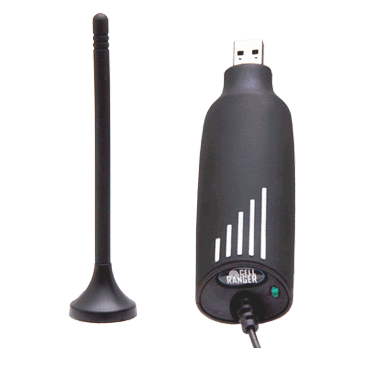
This is a product I have recently stumbled across. It is a cellular signal enhancer for those of us that suffer from cellular signal dysfunction. No, it isn’t blue. It is a very simple device and comes in two version for power purposes. One is the USB version and can plug into any USB port to receive it’s power (pictured). The other uses a standard 12V cigarette plug for power.

I would recommend the USB version because you have a lot more flexibility in where you can use it. They make cheap little 12V and regular power adapters that have a USB plug on them to power up any USB device without needing to use the ones in a computer. You could is one of these adapters to power up the Cell Ranger as well as any other USB powered devices you may use.

Anyway, you simply plug this little device into a USB port and it starts boosting the cellular signal around it for about 6 feet. It claims it will boost the signal by about 2-3 bars, thus improving clarity and preventing dropped calls. It actually has a microprocessor in it that takes the cellular signal and repeats it at a low level right around the antenna. It works for both cell phones and data cards on any network (except for some Legacy iDEN Nextel signals also used by some Canadian cellular providers). 

The unit costs $150 plus shipping. It can be used anywhere to give your cellular signal a little boost. Currently, I have never actually used a Cell Ranger but I intend to change that. I have one ordered and plan to test it out on an upcoming trip to Disneyland. I figure that it might be useful in the car on the way down and back up and will hopefully improve the signal I get from my hotel room. You have to think about your ability to connect and work while on vacation when your company consists of you and only you. When I have some more experience with the Cell Ranger I will give an update on its claims. If I like it, I will become a reseller and be able to sell the device at a discount. For now, you can get more info by visiting their website directly at www.getcellranger.com.

Dell Days of Deals

Author: Steve Martin

It’s that time again. Time for 10 consecutive days of deals from Dell on various electronics. Each day they will have special promotions on different items so it’s best to check back daily to see if the new deal is something you are in need of. Just click on the Dell image each day and it will be updated with that day’s deal. You will see great deals on desktop and laptop computers, flat panel TVs, digital cameras, home theater systems, Blu-Ray Players and more. Each day’s deals lasts for one day only so be sure to check it out. The deals start today and end on the 23rd.

Hard Drive Crash? Try Drobo.

Author: Steve Martin

I believe that it is a fact that all hard drives will eventually crash. This is why I make sure that I setup some kind of a backup for my clients. It is extremely important to have some kind of a regular backup in place. If you are manually backing up your data, make sure you do it regularly. DON’T FORGET! It would be best to setup your backup to automatically happen on a regular schedule. This will save you all kinds of pain, frustration, time, financial loss, blood, sweat, and tears. As soon as you start using a computer, start backing up your data. I have seen the hard drives of some clients last years and years. But, The hard drives in two different servers lost a RAID 5 hard drive (this means that no data was lost as we just needed to replace the missing drive in the array) after about 2 years. another client’s hard drive lasted about 4 years (not in a RAID 5 array) before it died. He luckily had most of a backup and lost very little data. I have also had a couple of workstations lose a hard drive after only a couple of months. In the workplace users will typically save their data to the server which is backed up and therefore we don’t backup the individual workstations. So, while these two workstations didn’t really lose much data, it could have been much worse.

I recently had one of my movie storage hard drives fail. It was a 500 GB external hard drive and it was pretty much FULL of movies. Did I have this hard drive backed up? Nope. In this particular case, the data was not all that valuable as I can easily redo the movies since I still have all the original DVDs. But, it will cost me a lot of time to redo all of them. It is a very good time to reflect on my backup practices though.
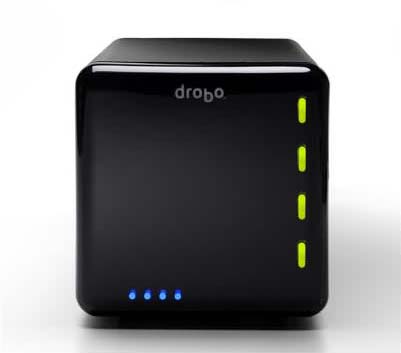
A while back, I ran across a very unique product targeting backup, although it may be reliable enough to use for everyday file usage and storage. It is called drobo and is short for “Data Robot”. It is basically an intelligent external hard drive.

It is a small box that can hold 4 Sata hard drives of any capacity. It has a unique new proprietary kind of RAID protection built in. It makes sure that if one of the hard drives inside it fails, your data stays completely in tact. And, not only that, but it lets you continue to work as if nothing happened. It alerts you by the lights on the front that something is wrong. You would then simply replace the failed hard drive with a new Sata drive of any capacity and it re-adjusts to provide you the additional space of the newly inserted drive.

I have known about the drobo since the first version and held off buying one for a few reasons:

  • First, price. This little baby costs $500 without any hard drives in it. While that isn’t a ton of money for this kind of protection (it’s actually kind of cheap when you look at the inferior competitors) it is enough to make you think twice about whether or not you really need this device instead of a couple of standard (stupid) external hard drives.
  • Second, version one was a bit slow in reading and writing to the device. If I am going to use this for daily use of files, I need it to be decently fast. They fixed this in version two. Reading and writing are now approximately twice as fast as version one. (If you just want to use the drobo as a backup device, you can still pick up version one for around $350 while they close them out.)
  • Third, I wanted a network attached storage device so that I didn’t have to leave a computer on in order to access the files. I could simply attach it to the network via a network cable and my files would be available to any of the devices on my network. Droboshare took care of this. Droboshare is a small attachment with an Ethernet port that connects to the drobo via a USB cable. It then makes all of the files on the drobo available to the other network devices. This also means a bit more expense though.


So, because of my crashed drive, I am going to purchase a drobo to test it out. I may start with just the drobo and add the droboshare later. I will start out with my existing hard drives and add more as my capacity needs grow. The second generation drobo can handle as much as 16 TB of data (first generation could handle up to 4 TB) so, it may be a while before I reach those kinds of capacities. If I fill all of the drive bays with drives and find that I need more capacity, I simply remove the smallest drive and replace it with a larger capacity drive. Drobo works in the background to re-configure everything so that my data is safe and I can begin using the extra capacity. This is not possible with standard RAID 5 configurations on other devices as the replacement drive must be the same size as the lost drive or the RAID array will not recognize the new drive.

I will let you know whether I like the drobo or not once I have one in my hot little hands to test. I plan on putting it through it’s paces to make sure it is a valuable investment. I may become a reseller of theirs if I am pleased with the results. Either way, backing up your data is crucial. If you haven’t thought about backing up your data, why don’t you go get started right now. You never know when your hard drive will crash.

Post Control in WordPress

Author: Steve Martin

I have setup a bunch of WordPress blogs for family and friends and have actually had several people abandon these blogs because they could not control who sees them. Some might be a little paranoid but still. They would like to be able to control who can see which posts. I know it is possible to make a blog private by requiring a user account and make it all or nothing but I would like to see more control than that.

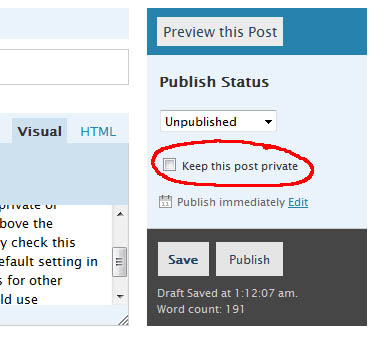
When you write a post, on the right you have a checkbox to make the post private. That is great but I think we should add several more checkboxes such as Everyone (anyone visiting can see that post without having to log in), Family (Only logged in users that have been marked as family can read these posts), Friends (Only logged in users that have been marked as friends can read these posts), Co-Workers (Only logged in users that have been marked as Co-Workes can read these posts), etc. The group names could be customizable but you get the point. You should be able to mark a post for multiple groups unless one of those groups is Everyone or Private. These two would trump anything else. Private posts would remain visible to the author of that post and admins only.

These groups are completely different than the user rights currently in WordPress as these would only control who could READ individual posts. The ones currently in Wordress control user rights and what they can DO in Worpress.

For me, I don’t care who reads what, but I have been asked about setting something like this up for several users and have not found any plugin that can do this. It seems very simple but I am no code guy and I actually do not think this should be a plugin but actually part of the WordPress core. Although I personally wouldn’t really have a need for it. I can definitely see the benefits of such abilities and can see how some of my clients and family and friends could utilize it.

For example, if you have a WordPress blog setup in a business environment, you could allow only certain departments to read certain posts. You may want to setup your groups as Accounting, HR, PR, Manufacturing, Sales, etc. That way, each department head can write things specific to their department and only their department would be able to read it when they were logged in (saves other departments having to wade through a bunch of irrelevant info to find info pertaining to them too). Any post aimed at everyone in the company would be marked with all the departments checked. They could mark anything they want the general public to be able to see as Everyone. So, it could be used for both internal and external visibility.

I guess this is more of a post control wish than user control. Each user in WordPress would then have to be put into one or more post category group. Users could be in more than one post category group but typically they would probably be in just one. A CEO would probably be in every post category group.

Anyway, that is my BIG feature request for the WordPress developers. If you like my idea, vote for it here.

Often when you buy a new computer, the manufacturer gives you the option of having Microsoft Office pre-installed. This seems rather convenient since you don’t have to install Office after the fact. Your other option is to order a retail version of Microsoft Office separately either online or at a retail outlet and install it after you receive your new computer.

So, which is better to do, OEM or Retail?

The answer is Retail. When you have Microsoft Office pre-installed on your computer, you are getting the OEM version of the software which is licensed for THAT computer and THAT computer ONLY. When that computer dies, that license of Microsoft Office dies with it. You cannot install it on your next computer.

A retail version of Microsoft Office comes with different licensing. Typically with the retail version you are allowed to install it on two computers. The two computers should belong to the same person though such as a person’s desktop computer and laptop computer. The Student/Teacher version goes one step further and will allow you to install it on up to three computers in the same household. Also, if one of your computers dies, you can have your retail license reset by Microsoft and install the retail version on the dead computer’s replacement. It is not tied to the “Original Equipment” it was installed on.

So, if you have more than one computer (and even if you don’t), get a retail version of Microsoft Office so that you don’t have to buy an individual copy for each computer and so you can still use your Microsoft Office license on a future computer when your current one dies.

And, to save even more money, you could install the Openoffice.org office suite for free. It is compatible with the Microsoft Office formats of Word, Excel, and Powerpoint. If you have a fairly complex Excel or Word document, it may have some formatting issues especially if you use pivot tables in Excel or if you are accessing a database. But, for the common everyday spreadsheet and/or text document, it will work just fine.

Firefox 3.0

Author: Steve Martin

I have just installed Firefox 3.0 on my computer. I used Firefox back when IE didn’t have tabbed browsing. Tabbed browsing is an absolute must in a browser. My problem with Firefox back then was its memory hogging issues. It would use a ton of a system’s memory and had to be restarted to free it up. Once Internet Explorer 7 came out and had tabbed browsing, I switched back. IE7 had much the same issue with memory. The two browsers seemed to stockpile memory and just keep adding to the amount they would steal with each new tab you opened. A big part of the problem was that they didn’t give the memory back even if you closed tabs. So, Firefox 3 claims to have made great changes to the way they use memory. I have set Firefox as my default browser and will use it for a while to see if it really has improved. If it has improved, Firefox will be my new browser (for now). I am betting that IE8 will improve its memory consumption as well and by that time I may switch back. Either way, I find it very useful to keep the two browsers installed and use whichever one serves me best.

Fried TV Tuner

Author: Steve Martin

I have a Windows Media Center PC that I use as our TV hub for the entire house. Through Xbox 360s we can watch TV that is being recorded through the Media Center PCs. It’s a great little setup and makes it so that I can watch any of our pre-recorded TV shows or live Tivo-like TV from any of the TVs in the house. I also have it setup so that we can see our movie library and we can watch any of those with the push of a button.

Well, about a week or two ago, I was adding another hard drive to allow additional capacity for our movie library as I had already filled 1 TB of space with movies and needed more room. I got another 500GB eSata hard drive and had opened the case in order to install the eSata ports onto the back of the computer. The TV tuner card had an extra little input area that was using one of the slots. I did not need this so I was removing it to allow space for the eSata card. After removing it from the slot, I set it on the tuner card just below it so it would be out of the way while I installed the eSata ports. The metal edge touched a couple of contacts on the tuner card. There was a spark and the smell of melting electronics and the tuner card was toast.

So, we have not watched any TV for a couple of weeks. Saw only a few days of the Olympics. Streaming the movies still works fine but TV is a thing of the past. I have ordered a new card that allows both analog and digital TV to be recorded and can record 2 channels of each (double dual card). It was out of stock at the place where I found the best price. I ordered it thinking they would get it in stock and ship it fairly soon. Well, it is still on backorder and we are starting to get a little worried. Our shows will be starting soon and I’m not sure what we’ll do having to watch the shows when they are actually broadcast instead of recording them and fast forwarding through commercials. I can’t imagine going back to the old ways of watching TV.

I’m keeping my fingers crossed that the new tuner card will ship soon but let this be a lesson to you that even when a task inside your computer seems pretty simple and shouldn’t require you to shut down the computer, shut if off anyway. If not for the sake of the components, then for your own safety. Who wants their fingers fried in addition to their computer components? If I had followed this advice, we would still be recording and watching our favorite shows and I wouldn’t be out another $120.

The ASUS Eee PC

Author: Steve Martin

This is the Eee PC by ASUS. I recently bought one to see how viable it could be for certain business applications. It comes equipped with 512 MB of Ram and a tiny 4 GB Solid State hard drive. The processor is an Intel 900 Mhz. It looks like the the video takes 8 MB of memory from the RAM so you are actually left with 504 MB for the computer’s use.

It is preloaded with a custom distribution of Linux which I didn’t find very useful (although others do). So, I loaded Windows XP Professional on it. One thing to note is that you must install XP SP2 or it will not install correctly. I only had XP SP1 so I had to slipstream SP2 into it and then it worked fine. Depending on which Eee PC you get, they will include a driver disk for XP. You install the drivers once you have XP loaded.

Once I had XP installed and all the drivers, I applied the available updates for XP. This included installing SP3. By that time, the hard drive was getting pretty cramped (I was afraid SP3 was not going to install because of so little space available). I went through and deleted just about anything I could that would still let XP run without errors. After everything, I actually have about 1.4 GB of space left on the 4 GB hard drive.

One possible use for this little guy is to allow remote desktop (terminal services) connections to a remote computer in order to run certain applications. In this instance, the Eee PC doesn’t need to have much hard drive space as nothing gets stored locally. For the sake of speed, I would recommend formatting the drive to FAT32 instead of NTFS when installing XP. While NTFS has some additional features, it tends to run a little slower. This is really felt on a little computer which doesn’t have the fastest processor or very much RAM.

For now, my kids enjoy having a tiny laptop they can play games on. They play lots of games at sesamestreet.com. This is a picture of my two kids playing pinball on it.

So, if you don’t need a ton of hard drive space for your particular application and you are looking for a small form factor, this is a very inexpensive solution. Total cost was about $350. I already had an XP license allowing me to upgrade it to XP. If you do not, you need to factor in that cost as well.

9-4-08  Update. I showed the EeePC to my client that I was testing it out for and he thought it was perfect. They are using it every day now. My poor kids were in tears when I told them that I sold it to my client. Maybe if they ask Santa…