Christmas Gift Pick 2

Author: Steve Martin

Ok, so I’ve found a few more of the 15″ Digital Picture Frames. There are a few different brands and I can’t say if they are any good or not. If I were in the market to be purchasing a new frame, I would still go with the Viewsonic I wrote about in a previous entry because I trust the name. But, these others may be equally good if not better, so who knows.

Pandigital PAN1502W02 15 Digital Picture Frame $149.97

Ok, so it’s sold out but maybe they’ll get more in stock. It was selling for $149.97. We had purchased a Pandigital as a gift once and the quality really was nice.

___________________________________

SmartParts SP15MWA 15 Walnut Wood Digital Photo F $119.99

I have a client with a SmartParts digital frame that his wife gave him for Christmas and it also looks very nice.

___________________________________


Smartparts 15 4:3 Ratio Digital Photo Frame $119.99

I tend to see a lot of the SmartParts frames available from many sites. Hopefully that means that they make a good product.

___________________________________

Sunpak SF-150-42001SL 15 TFT LCD Digital Frame – $81.97

I’ve never heard of these guys but the price is sure right. Hopefully the quality is at least decent.

___________________________________

I just double checked the prices before posting this. They could always change by the time you read this and they could sell out. Enjoy.

Christmas Gift Pick

Author: Steve Martin

ViewSonic VFM1530-11 15

This beautiful, extra large digital multimedia frame plays music and supports most video formats. Choose the ViewSonic VFM1530-11 with a high resolution 1024×768 LCD panel for clear and crisp photo images. The 4:3 aspect ratio gives you minimum distortion or data loss. It’s equipped with a USB connection for easy content download and remote control. Handy brightness and contrast ratio adjustment and energy savings with programmable on/off, keep your photos right within view. This makes a lovely gift for special occasions and for anyone wanting a grand view of all their images. Effective Viewing Area: 12″ x 9″ (304mm x 228 mm) Brightness: 400 cd/m2 (typ) Contrast Ratio: 500:1 (typ) Aspect Ratio: 4:3 Viewing Angle: 120° (H) / 100° (V) Memory Card Supported: SD/SDHC, MMC, MS/MS Pro, CF Image File Format: JPEG Video Format: MJPEG, MPEG 1, MPEG 4.

This is my gift pick for this Christmas holiday. I bought another 15″ digital picture frame similar to this for my wife for Mother’s Day. She loves it. The reason I pick this one is that, as of this writing, it is selling for $139.99. Also, it is made by Viewsonic. I have always been happy with Viewsonic products in the past. And last but not least, it is large. A 15″ frame mounts nicely on the wall. We have so many digital pictures just hiding out on a hard drive that we don’t get to see very often. This allows us to be able to see the pictures and enjoy them. So, check it out and snag one before they are gone. I have already watched Amazon sell out of them and I’ve watched the price fluctuate up to $199, so get one ordered while you can still get it cheap and while it will still make it before Christmas.

opendns.com

Author: Steve Martin

opendnsI am a big fan of opendns.com. You may not have even heard of it. Most people don’t even know what DNS is and would therefore have no idea why they would need something called opendns.com. Well, DNS is how your computer is able to figure out how to load each website you visit. When you type in http://stevemart.in as you frequestly do, DNS is what takes that address and figures out what the underlying IP address is for it. The IP for http://stevemart.in currently happens to be 65.254.250.110. If a switch hosts, that IP will change. DNS would be able to find the new address. If we had a DNS engine in our own brains, it would be like someone who has no idea where I live say “I want to go to Steve Martin’s house”. His little DNS engine would give him my exact street address so that he could go there. Wouldn’t that be nice? I could go through the process DNS uses to obtain the IP addresses of domain names, but for this article, it’s not that important. So, let’s continue.

Any ISP you use has DNS servers setup for their customers to use. Usually everyone just uses them without thinking about it because it is automatic and they don’t know they even have an option. Well, you do, and opendns.com claims that they do a much better job at DNS than the ISPs. If it were as simple as that, that may be enough reason to start using opendns.com but there is SOOOOO much more to it than that. Opendns.com is a way to actually control the DNS for a computer or network. Let’s say you don’t want the people in your home to be able to go to a particular website or even a particular catagory of websites. Can you imagine a scenario where that might be possible? If so, you would create an opendns.com account and program the opendns.com IP addresses into your router so that whenever someone connects to your network, all their website requests go through opendns.com instead of your ISPs DNS. Then you customize your opendns.com account to block certain catagories of websites or even individual websites as you see fit. Now anyone on your network that tries to visit a site that is in a blocked catagory will not be successful in visiting that site. They will get a page that lets them know the site is in a blocked catagory. Pretty nifty eh?

If you choose not to setup an opendns.com account, you can still simply program your router to use opendns.com or even individual computers and at the bare minimum, they will be a bit more protected against certain threats online. You see, opendns.com actively blocks many of the domains that certain viruses are known to “phone home” too when a computer gets infected.

I have opendns configured at several of my clients’ locations as well as my home and it does a great job of resolving DNS requests. And, we get a little bit of extra protection to boot. You’re probably wondering how much an amazing service like this costs as it is quite useful and would be so nice to use. Well, the greatest thing about it is that it is 100% FREE. That’s right, you get everything completely FREE. As of tomorrow, they will be launching a new enterprise version which I assume with carry some new bells and whistles but it will be a value added service which you won’t have to use. So go to http://www.opendns.com and check it out. You have absolutely nothing to lose and quite possibly a whole lot to gain.

I haven’t really gone through the nuts and bolts of actually setting up opendns on your network as I really just wanted to introduce it. You can get great instructions from their site but if you have specific questions, let me know.

I’ve been married for 9 LONG years (just kidding honey) and have lived in 3 different homes with a short stay of about 6 months at my in-laws while one of our homes was being built. Since our first home, a condo, we decided to leave our outdoor lights on all night. The idea behind it was to not let our home be dark around it. Darkness gives criminals lots of great hiding spots. So, any place where we have an outside door, we have a light. In our 9 years of marriage we have never had our home or our vehicle broken into. There is one exception to this and it is when we lived at my in-laws for those 6 months waiting for our house to finish being built. My in-laws do not leave their outside lights on through the night so it is extremely dark around their house at night. We had parked our car in their driveway and when we woke up in the morning, we found that our stereo had been stolen and the trunk had been emptied. The funny thing about it is that my mother-in-law was in charge of the neighborhood watch program at the time. You can never know for sure, but I am guessing that our car wouldn’t have been touched if their house had been well lit on the outside.

So, my advice to you is to leave you outdoor lights on throughout the night. If you are concerned about a higher electrical bill, maybe put a motion sensor on your lights so they only turn on when someone walks nearby. But, if the lights are already on, the burgler probably won’t even check your house and will head to a house with dark hiding spots. Also, with the newer CFL light bulbs, you can put in a 100 watt equivalent light while only actually using 23 watts of power. Or use a 60 watt which draws only 13 watts. As long as you keep things lit up. Below are a couple of pictures I took this evening. One with no light on and the other with a light on. Which one appears more inviting to a burgler? You decide.

IMG_1655

IMG_1654


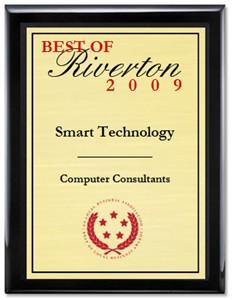
I’ve received this award AGAIN!

Author: Steve Martin

Once again I have been “honored” with the Best of Riverton Award. All I have to do is send these guys a bunch of money to ship the plaque to me. What a business. I’m surprized they haven’t been investigated. But, I guess they aren’t really doing anything illegal. If someone is stupid enough to send them money for a fake award, too bad for them.

2009 awardPress Release

FOR IMMEDIATE RELEASE

Smart Technology Receives 2009 Best of Riverton Award

U.S. Commerce Association’s Award Plaque Honors the Achievement

WASHINGTON D.C., June 8, 2009 — Smart Technology has been selected for the 2009 Best of Riverton Award in the Computer Consultants category by the U.S. Commerce Association (USCA).

The USCA “Best of Local Business” Award Program recognizes outstanding local businesses throughout the country. Each year, the USCA identifies companies that they believe have achieved exceptional marketing success in their local community and business category. These are local companies that enhance the positive image of small business through service to their customers and community.

Various sources of information were gathered and analyzed to choose the winners in each category. The 2009 USCA Award Program focused on quality, not quantity. Winners are determined based on the information gathered both internally by the USCA and data provided by third parties.

About U.S. Commerce Association (USCA)

U.S. Commerce Association (USCA) is a Washington D.C. based organization funded by local businesses operating in towns, large and small, across America. The purpose of USCA is to promote local business through public relations, marketing and advertising.

The USCA was established to recognize the best of local businesses in their community. Our organization works exclusively with local business owners, trade groups, professional associations, chambers of commerce and other business advertising and marketing groups. Our mission is to be an advocate for small and medium size businesses and business entrepreneurs across America.

SOURCE: U.S. Commerce Association

CONTACT:
U.S. Commerce Association
Email: PublicRelations@us-ca.org
URL: http://www.us-ca.org

###

How to land your next job

Author: Steve Martin

I thought this was a pretty funny video on how you can land that next job you are trying to get.


Pepsi Max Job Interview Funny CommercialFunny bloopers are a click away

A friend of mine posted this arrangement by Jon Schmidt on facebook a little while back. I thought I would share it here for anyone that might be intersted in listening to it. It is really good. As soon as he makes it available in mp3 format, I am going to snag it. Apparently he has some legal hoops to jump through before he can sell the mp3 version.

JohnSchmidt

I frequently recommend to my clients that they do not use the “free” e-mail accounts that their ISP offers them when they sign up for Internet service. At first glance you may think your ISP is being really generous to you, their new customer. I mean, who can beat free, right? For no extra charge, you can create and begin using several different e-mail accounts all @yourisp.com. You start thinking of the possibilities, myname@yourisp.com, or nynickname@yourisp.com. Too many to choose from. Well, let’s re-think creating them in the first place.

First of all, before you create even your first e-mail account @yourisp.com, think. How much are you paying your ISP each month for Internet service? Now, if you decide to stop paying your ISP for your Internet service, do you think they will still let you use your “free” e-mail account with them? That’s right, the answer is a big fat NO! Those “free” e-mail accounts are anything but free. It is a marketing ploy by your (and every other) ISP. They want to “give” you those e-mail accounts with the hope that you will actually start using them. They want you to give all your friend’s, family and clients your new e-mail address so that you become deeply entrenched in the use of their e-mail. Then, when you get that advertisement for competing Internet service at half your current cost, you will throw it away thinking “then I would have to change my e-mail address, what a pain”. And yes, what a pain indeed. You may have used that e-mail address with your online bank account, your prospective clients (what if they try to e-mail you), All your friends and aquantences. Even your family (Hmmm, that one might not be so bad….kidding (but only kind of)). If you switch your ISP, they will all get a bounce back message that the user account no longer exists. so, it is probably best that you never switch ISPs right? Wrong!

Even if you decide to stay with your current ISP, make the e-mail switch now. Stop using their e-mail addresses. You can create free e-mail accounts that truly are free, no matter who your ISP is. Use services such as yahoo.com, gmail.com, hotmail, or dozens of others. Most of them are browser based, which means you can access them through an Internet browser window using just about any ISP. So, if you were to switch ISPs, it would not affect your new e-mail accounts one bit. If you prefer to use an e-mail client like Outlook, Outlook Express, Windows Mail, or Thunderbird, you may want to look at gmail as I know they offer this capability (not all free e-mail services do). Just get away from your ISP e-mail addresses. They are only “free” if you continue to use them as your ISP. If not, they will remove your e-mail account the day you stop paying them for their service.

So, do yourself a favor and switch to a truly free e-mail account. In the long run, you will be very glad you did.

Windmill Poles

Author: Steve Martin

powerlinetowerThe craze these days is to green up our lives. We are supposed to buy hybrid cars, put solar panels on our roof, buy more energy efficient appliances and light bulbs, in addition to buying only organic food (thanks John and Kate plus 8). I think it’s great. I am not a tree hugger or anything like that, not that I have a problem with those of you that dedicate yourselves to saving the planet. I think we really should be good to the planet that we all enjoy. I am just not fanatical about it. I do my part by recycling, but only because our city charges me for it whether I actually do it or not. And it doesn’t take any extra effort really. So yes, I’m doing my part.

I have been working on a project for a new company recently. The company is looking to distribute a brand new windmill technology that is much more efficient than the ones we are accustomed to seeing all over the place. So, I’ve had windmills on the brain and have had to do a little research into the benefits of wind electrical generation. It’s pretty interesting stuff.

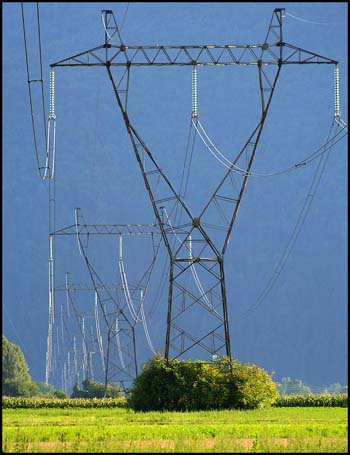
Anyway, I was standing on my back deck looking out at the Salt Lake valley since the weather has been so nice. I looked out at the west part of the valley and noticed a big long line of power poles which I assume carry our electricity across the state, possibly into neighboring states. These aren’t the little utility poles we see in the neighborhood, these are the giant ones that are really tall and have lots of power lines on them similar to the ones in the picture.

It made me think of a GREAT idea. When a windmill is installed somewhere, a big chunk of the cost is the big tall pole that must be installed in order to get the windmill high enough to reach the higher, faster, more consistent winds. Well, why not use those poles that are already there? Lets stick a smaller sized windmill on each and every power pole out there. They are already pretty darn tall and typically in less populated areas with less wind obstructions. AND, you have a bunch of power lines to tap into right there. Each of those towers should be generating a bit of electricity as they carry the power to their various destinations.

I am guessing that there is at least a little power loss trying to send power over such long distances. By placing a highly efficient windmill on each tower, you could compensate for that loss and probably end up with more power at the destination than you initially put in at the source. The first portion of building a wind farm is already in place which means a lot of the initial cost is eliminated. And with the new generation of free power, we will all save some change each month on our power bill (my favorite part).

Now, all I need to do is get an investor or a grant from the government and make it happen. Anyone want to invest in my idea? It sounds like a winner to me.

I am a huge fan of the Windows XP Media Center operating system (also Vista Home Premium). It makes it so easy to save all your media content on one computer and have it shareable throughout your home via other computers or Media Center Extenders. Right out of the box you have the ability to share your music, pictures, videos, TV, and radio. You can also install additional programs to extend the functionality of your Media PC. I very much enjoy the program “My Movies” as it lets you create a database of your movie collection complete with an image of the movie cover. Not only that but if you RIP the movie to your hard drive, you can simply choose “Watch” and it will immediately begin playing. I have a media library of over 250 movies so far that are (almost) all available at the click of a button (I say almost because I haven’t yet figured out how to RIP a movie WITH the subtitles in tact, so for those foreign movies we still have to be old school and put in the disk).

I thought I would make this blog entry about the process I use to RIP movies as there are some hoops to jump through in order to do it successfully. Let me start off by saying that I do not endorse ripping movies that you do not own. This is not intended to help you steal movies but to help you put your legally purchased movies onto your hard drive. Having said that, let’s get started.

Backup

First, I like to make a backup copy of the DVD. I have used two programs to do this. I started with “ICopyDVDs2” which is pretty good but there are some disks (mostly Sony Movies) that it cannot do. It is pretty cheap software though. Later on I found “DVDFab 5”. This one has a much better success rate. They are both able to squeeze a movie down to fit a standard single layer DVD from a dual layer original. So, using one of these two programs you make your copy of the original disk. One additional feature of DVDFab 5 is that you have the option of copying just the main movie without all of the other special features, games, etc. This is helpful so that your backup copy is as high quality as possible despite having possibly been shrunken down to fit a single layer disk. Also, by doing this step first, you can remove any encryption the original movie may have had so your backup copy is easier to RIP.

RIP

Next we rip the movie from the newly created backup copy. Ripping from the backup makes the resulting movie a bit smaller in size so as not to take up too much hard drive space. To do this, I use “DVD Decrypter”. I like DVD Decrypter because it has a setting that will combine the various VOB files from the DVD into a single large VOB file. Usually they are split up into 4 to 6  one GB files. You can go either way but the single file saves a step later. And again, there are some disks that don’t rip perfectly using DVD Decrypter. DVDFab 5 can fill this void as well. If using DVDFab 5, I will first copy the movie and then when DVDFab 5 asks if I want to burn another copy, I will go to the temporary area DVDFab 5 uses to store the individual VOB files and copy them out of that directory to be used later. The whole point here is to get the VOB (or VOBs) to use for the next step.

Convert to MPG

Next step is to convert the VOB or VOBs to a single MPG file. The program I use for this is “Video ReDo Plus”. There are three reasons for using this program. One is that the ripped VOB or VOBs are sometimes off in their timing. Video ReDo re-times them so they play correctly using the “Quickstream Fix” feature. Two is that it has the ability to combine multiple video files into a single file using it’s “Joiner” feature. (if you have multiple VOBs, first run the VOBs through the quickstream fix which converts the file to MPG and re-times it simultaneously, then use Joiner to paster the different pieces together into one large file). Three is that it converts to the MPG format. The MPG format is compatible with playing through a Media Center Extender like an Xbox 360 through your network. The file that results from using this program is the finished file ready to play.

Enjoy

That is basically it. Now that you have your finished MPG file, you can organize them into individual folders and then point “My Movies” to each locally stored folder. My Movies then looks in that folder and plays the MPG file when you click to “watch” from your Media Center Extender. If you have questions about any part of the process, please comment so that I can clarify a little better.

Amazon Movies

I want to leave one note about the digital movies that you can buy from Amazon. I was excited about this new way of purchasing movies until I actually tried it. I bought “The Dark Knight” DVD from Amazon and they included a digital download of the movie for free. This was great because I wouldn’t have to go through the process to RIP the movie myself. Well, one night my wife and I decided to watch it so I downloaded the movie which is pretty simple once you install the Amazon video download software. I don’t know if all of the Amazon movies are in the WMV format but this one was. I saved it in a directory where we could play it through an Extender and we headed downstairs to watch it. The picture looked great, just like a DVD. But, the sound was not good at all. We found ourselves turning up the volume so that we could hear what the actors were saying only to be blasted away at the next action scene. So, I put in the DVD and the sound was just fine after that. Later on, I ripped the DVD into the MPG format and both the video and audio are fine. I don’t know if there was just a problem with this particular Amazon movie download or if this would be the case for all their movies but it left me not really wanting to download a movie from Amazon again. I’ll stick to actual DVDs and I’ll RIP them myself. At least it didn’t cost me anything.