Remove iTunes DRM Protection

Author: Steve Martin

music-notesI wrote an article about the benefits of buying your online music from Amazon instead of iTunes called i Buy Tunes at Amazon (DRM Free). Well, you may be wondering if there is anything you can do if you have already purchased a bunch of music from iTunes. The answer is YES! You actually have a couple of options. I am going to share my favorite option with you.

Since iTunes was pretty much the first legal avenue for purchasing music online, you may have accumulated a good collection before you even had any other options. A quick Google search will show you a bunch of free and inexpensive software programs that claim to be able to remove the DRM protection from your protected music. I have not tried any of these programs but you are welcome to give them a try. My solution is much simpler, yet a little more time consuming. You won’t need anything more than some blank CD-R disks and a CD burner. Got those? Ok, Let’s get started.

First, place one of your CD-R disks into your CD burner. Next, burn your DRM protected music as an audio CD playable in any CD player. Once completed, rip the music back onto your hard drive as MP3 files. You can use iTunes or Windows Media Player to do this. Just make sure you go into the RIP settings of either program to instruct it to rip as MP3 and not MP4 or WMA. That’s it! By following this process, you not only get your music DRM free, but you have created a backup CD in case your hard drive crashes. Kind of a forced backup (sometimes that’s exactly what we need in order for us to actually make a backup). 

So, get started burnin and rippin and you’ll soon have a completely DRM free music collection.

The Cutest Kids EVER!!!

Author: Steve Martin

kids-01-17-09We made our annual trip to Kiddy Kandids last weekend. We used to get pictures every year for every kid on or near their birthday, but I think we are going to go once a year and get all of their pictures done in one sitting. Thier birthdays are close enough together that it works out just right. Anyway, I wanted to share the pictures of the cutest kids on the planet. 
kids2-01-17-09

abby-01-17-09
tyler-01-17-09

makenna-01-17-09

i Buy Tunes at Amazon (DRM Free)

Author: Steve Martin

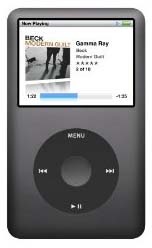
ipod1Let me start out by saying that the people at Apple are very good marketers. They come out with a shiny new device, give it a clever cute name that starts with a lower case i, and convince people that they can’t live without it. Forget the fact that it costs double what other companies charge for similar items. Forget the fact that the nice new shiny product is designed to lock you into using their software in order to make them more money. Just open your wallet and buy from Apple.

You may think that I am bitter towards Apple but I truly am not. I appreciate them very much. They do come out with some very innovative products. And, their product designs are very sexy and second to none. I don’t believe I have ever found any Windows PC hardware that is half as stylish as the iMac. All PC and other electronics manufacturers should take lessons from Apple and their clever, innovative product designs.

I most especially appreciate Apple for revolutionizing the music industry. Before they created the iPod, the only way to get music online was to download it illegally from Napster or Kazaa or some other Peer-2-Peer program. We really didn’t have any other online option but to become cyber criminals. Then the iPod came out, and with it…iTunes. Finally we no longer had to lay awake at night filled with the guilt of having downloaded hundreds of songs without paying for them. We had a way to get the same stuff legally. Each song only a buck, sometimes even cheaper. Buying an actual CD just seems weird anymore. Thanks Apple.

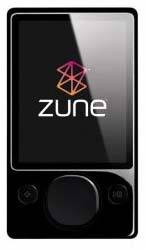
zuneBut, did you know that all the music you download from iTunes is locked up? That’s right, the MP4 format is embedded with DRM technology. What the heck is DRM? It stands for Digital Rights Management and it is designed to limit the way you use your music. In the case of Apple and iTunes, I believe you are limited to listening to the music on up to 5 devices. Well, I don’t want Apple or the music industry to be able to decide how many devices I can listen to my legally purchased music on. What if I want to listen to it on SIX devices. If purchased through iTunes, I just plain can’t. Luckily, iTunes is NOT the only place to purchase music online.

Initially, I was like most people and didn’t fully realize that everything purchased through iTunes was all locked up. And, once I found out it was, I didn’t realize I had other options anyway. Then I learned about Amazon MP3 Downloads. Through Amazon MP3 Downloads, you can get the same music found at iTunes without any DRM protection whatsoever. You can still use iTunes to play your music purchased at Amazon or you can choose to use Windows Media Player or both (or any other media player for that matter). The MP3 format is the only format fully compatible with virtually ANY portable digital music player. From what I understand, the Microsoft Zune cannot play music purchased from iTunes, just like the iPod can’t play music ripped in the Microsoft WMA format. So, stick with MP3s and you are universally compatible all the way around. If you are ripping your physical CDs, make sure you rip them as MP3 files. This means you will have to change the default settings in both Windows Media Player and/or iTunes as both Microsoft and Apple want to lock you into using their format as it then locks you into using their software and their products. 

I have rambled MUCH more than I had intended to for this article. The main point of the article is to let you know that you CAN get DRM free music through Amazon so go check it out and enjoy your music without limitations. In the long run, you’ll be glad to be free of the DRM chains, even if you don’t yet realize it.

The Ultimate Laptop

Author: Steve Martin

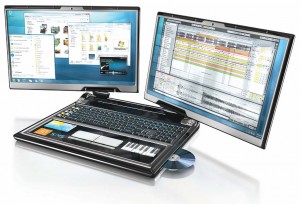
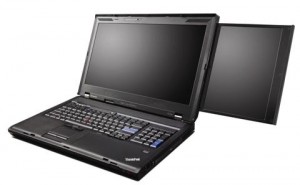
lapdualbigI think I’m in love…with a laptop. Yet, this laptop doesn’t even exist. It is a concept design put together by PC World as a wish list of things one might want to have in a laptop. Well, when I first saw the design I almost started drooling. Ok, maybe I actually did, but only a little. I would LOVE to have dual screens built into my laptop. Many of the other features in this concept drawing I could do without but those dual screens…oh baby!
I am big into screen real estate. My old tablet PC had screen resolution of 1024 x 768 while my new tablet sports resolution of 1400 x 1050. The higher resolution makes such a huge difference. Higher resolution is something I am willing to pay extra for. Now, if they made a laptop with TWO screens built in, I would be standing in line to buy it. Think of THAT kind of screen real estate in an all-in-one design. Ideally, I would like the screens to be 12.1″ or 13.3″ and the rest of the laptop to be normal size. I would also like it to have tablet functionality using a stylus. I don’t care for the 10 key built in (I suck at accounting). It must have a touchpad as I can’t stand the stupid little eraser nub that the Thinkpads always have in the middle of the keyboard. And, it needs to have a built in optical drive. Weight IS a factor as well. With dual screens you have to accept a little more weight but I would hope it could stay below 5 pounds. I believe my current tablet is around 4 pounds. Other than that, I am not too picky although a built in Sprint data card would be nice.

lenovodualLenovo recently announced a laptop that actually DOES have dual screens although it is not quite what I am looking for. Theirs has a main screen that is 17″ and a secondary screen that slides out of it that is 10.6″. See a video of it at CES 2009. I think they should have had a 10.6″ screen slide out of both sides of the main screen. It weighs in at 11 pounds though. At nearly 3 times the weight of my current laptop, that would be a little much for me to lug around. And, I would prefer to have two identically sized screens instead of a smaller slide-out. A third negative is price. The Lenovo starts at $3,600. That’s a little out of my league. Ok, that’s a LOT out of my league. But, the concept idea is now a reality. Now it is a matter of time before the various manufacturers start putting their own twist on the idea and come out with a bunch of different dual screen laptop models to choose from. I can’t wait for the love to become a reality for me.
So, what features are on your laptop wish list? Post comments and share your ideas.

Awesome Xbox 360 Elite Refurb Deal

Author: Steve Martin

xbox-360-elite-r-unit

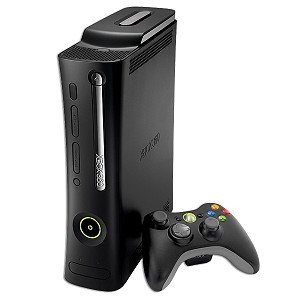
I don’t usually post a lot of product specials but this is one I could not help but share. I am a big Xbox 360 fan. No, I am not a big gamer. I use the Xbox 360 for it’s Media Center Extender functionality. It is so nice to have all of your media accessible on any TV equipped with an Xbox 360. Anyway, here’s the deal:

Xbox 360 Elite System w/120GB, HDMI, Wireless Controller & Headset (Refurbished) – $279.99

That is an awesome price. They usually sell for over $400, and this is the ELITE system. The only drawback I can see is that it says it comes with a 60 day warranty. I’m not sure if that is the geeks.com warranty or the Microsoft warranty (probably Microsoft). Anyway, check it out and decide for yourself. If you don’t already have one, it might be a good time get one. If you DO already have one, it might be a good time to pick up another one.

(Update 1-20-09) I just checked the link and anyone who did not get in on the refurb deal is now out of luck as they are sold out. Congrats to those that got in on the deal.

Cheap Virtual Fax Machine

Author: Steve Martin

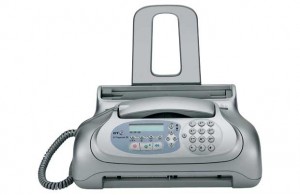
faxI love saving money. I’m sure most of you do too. There’s something about finding that product or service that you have been looking for at a bargain price. It fills you with a sense of satisfaction. Now, as long as that product or service ends up lasting as long as, or working as good as it’s higher priced alternative, you end up keeping that sense of satisfaction. Otherwise, you probably should have forked over the higher price for the better quality. There are some things you probably shouldn’t skimp on. Fax service is not something you should have to pay a lot for.

There is a very inexpensive way to be able to receive faxes for nothing, or very close to nothing. I have used these services successfully for years and have saved all kinds of money. And, in this ecomony, saving money is what we are all trying to do.

For starters, many people just want to be able to receive an occassional fax but don’t want to pay for an additional phone line every month and don’t really want or need to own an actual fax machine. For those of you that fit this bill, I would recommend K7. The K7 service is totally FREE. You are provided with a random phone number in the Washington state or Oregon area. This phone number is linked to your e-mail address. Whenever someone sends a fax to your assigned phone number, it is converted to a digital file and e-mailed to you as an attachment. You decide if you want to print it or not (saves paper too). Of course wth this free service there is a catch. After a time of inactivity (you don’t receive any faxes), your account is closed and the number can be assigned to someone else. Back when I first used this service, that length of time was 30 days but it looks like they may have upped that to 90 days. But, since you really only need the service occassionally, the next time you need to receive a fax, just sign up again and get a new fax number. Remember, it isn’t costing you ANYTHING.

K7 Summary – FREE, Out of state number, account closed for lack of use, no fax sending options.

____________________

The next step up is to have a more permanent number so that you don’t have to hassle with getting a new number every time you need to receive a fax. This option will actually cost you but it also adds some additional features that really make it worth it (and it is still pretty darn cheap).  This service is actually offered by the same company that gives us K7. The service is called Faxaway. It starts out much the same way, you get a phone number in Washington state or Oregon and whenever you get a fax, it gets converted to a digital file and e-mailed to you as an attachment. The first difference is that you actually have an account with Faxaway that you add money too. I believe that you start out adding about $12 to your account by credit card. There is a $1 per month fee to keep your account open. So, that initial $12 could last you an entire year and you don’t have to worry about losing your fax number. When your account drops to zero, they will automatically charge your credit card an additional $10. I currenty use this option instead of K7 so that I can print my fax number on my business cards without having to worry about losing that printed number and thus having to redo business cards every time I lose my fax number. The next BIG difference is the ability to send faxes from your e-mail account (no phone line needed). Once you have an Faxaway account, your e-mail address is authorized to send faxes via the Faxaway service. You simply send an e-mail to the fax number followed by @faxaway.com. So, if I wanted to send myself a fax, I would attach a file to an e-mail and e-mail it to 12068886048@faxaway.com. Once I hit send, my attachment would come through as an actual fax on the receiver’s (me) end. Each sent fax draws from your pot of money in your Faxaway account and costs roughly $0.10 per page.

Faxaway Summary – Roughly $12/year, Out of Sate number, won’t lose number, able to send faxes as well as receive.

___________________

If you don’t like the out of state phone number idea, you can add an 800 number which forwards to your assigned Faxaway number for about $2/month (plus minutes used). They also offer local numbers in certain areas for about $5/month (plus minutes used). This service is from Kall8. I don’t use this service since I receive faxes so infrequently that an out of state number doesn’t really matter. If you are in need of an 800 number, this is a very inexpensive way to get one. It is very flexible and allows you to change the number it is pointed to whenever you want and as often as you want. So, you could use it for fax OR voice service.

There are other services out there that offer virtual fax options but the price is so much higher. The one that is known by most people is efax. The efax service starts at about $17/month. It works much the same way as Faxaway but limits the amount of incoming pages you can receive before charging you more. There is no limit on the incoming pages of both K7 and Faxaway.

Call Santa

Author: Steve Martin

It’s that time of year again. Santa Claus is getting presents ready for all the good girls and boys. He sure has a lot to do. Can you imagine trying to make toys for every single child in the entire world? And, he has to deliver them all in a single night. He’s so busy that he has helpers visit all of the malls and shopping centers to allow children to tell him what they want for Christmas. The helpers must report to him daily or something and they must have an amazing memory because I never see them write anything down.

Anyway, our children are deathly afraid of Santa (and his helpers). Oh, they love him and love the fact that he brings them presents every year on Christmas, but to sit on his lap would scare them to death. They are more than happy to watch other children sit on his lap in the malls but no, they do not want to get in line to sit on his lap themselves.

So, we choose to call Santa and leave him a message. I actually have a direct line to him (801) 738-0668. This number goes directly to his voicemail. When a child calls him, they simply tell him their name and age and what they want for Christmas. Santa is then notified via e-mail and can listen to the message via an attached audio file. It saves Santa a lot of precious time. Sometimes parents want to hear the message that Santa receives. Santa is happy to forward the message to their e-mail address. They simply need to let him know via e-mail the approximate time (with timezone) their child left a message and their child’s name and age. He can then find the message and forward it to them. Santa’s e-mail address is santa@claus.fami.ly.

Hopefully your kids are not as afraid of Jolly Old St. Nick as my kids, but if they are, now you have a way for them to tell Santa what they want for Christmas. Have a very Merry Christmas!!!

Passwords

Author: Steve Martin

If you are anything like me, you have dozens of different web sites that you are required to log into in order to access information. These may include your e-mail accounts, shopping web sites, banking web sites, credit card web sites, school sites, even blogging requires a password to get in and write new posts. These sites require passwords for good reason. You wouldn’t want someone jumping into your Amazon account and buying lots of stuff on your card would you? Or, think about the headaches of someone getting into your banking account. I know some people personally that have had people get into their ebay account and change pricing on their listed auctions.

You may have noticed my post (two before this one) called “Protected: Highly Confidential (Password Protected Post)“. Well, I guess I have some pretty curious siblings because two of them decided they were going to “hack” into that post (and they were successful). I don’t really care who gets into that post which is why I gave it a VERY simple “password”. But, it brings about the question of how important secure passwords are. Think about the password (s) you use for the various sites you visit. Are they just a single word? Not good as any dictionary tool could crack it. Are any of your passwords just a important date? Not good as anyone that knows you probably knows any important dates in your life or could easily find them out. Does your password contain letters AND numbers? Better. At a minimum, I would suggest using letters and numbers. You may want to throw in some unusual characters like % or & or #. Make your passwords at least 8 characters in length. The idea is to make it VERY difficult for anyone to guess.

So, if you have easy to guess passwords, I would suggest you start changing them to something a bit more difficult to guess…..because my siblings are on the loose and may hack in at any time.

$40 off 1TB Hard Drive

Author: Steve Martin

This is a great deal. I haven’t seen a 1 TB hard drive this cheap ever. So, I thought I would share it with anyone in the market for a bigger hard drive or an extra hard drive. For those that don’t know, 1 TB is 1,000 GB. That equals a lot of room for data. It is a deal from Dell and is $40 off 1TB SATA Barracuda 7200.11 Internal Hard Drive! Coupon Code: 9BPJP5C2PHKMMC. That coupon code is important. Use the link above and add the item to your cart and then apply the coupon code and it will take off the $40. Shipping is very decent too.

This content is password-protected. To view it, please enter the password below.